You shipped. Now you're staring at an analytics dashboard wondering if any of this traffic actually matters.
One install. Skip the three hours of wiring up GA4 by hand. Know which source is producing paying users, not just which source is producing visits.
You built on Lovable or Bolt or Cursor or Claude Code. You got the app live in a weekend. You posted on Twitter, shipped to Product Hunt, maybe got a spot on Hacker News for an hour. Now you've got traffic (some real, most tire-kickers) and you cannot tell which source produced the person who just paid you. That's the gap. That's what ROI Insights closes.
The real problem
Google Analytics tells you what happened on your site. It can't tell you what's producing paying users.
You have GA4 installed. Maybe react-ga4. Maybe the gtag snippet you copy-pasted into your index.html. It shows you 2,400 visitors this week. It shows you a bounce rate. It shows you an average session duration. It does not show you which of those visitors came from your Product Hunt launch versus your Twitter post versus the Hacker News thread versus organic search, let alone which of those sources produced the four people who actually signed up and paid you.
That's not a GA4 limitation you can configure your way out of. It's a category limitation. GA4 is reporting infrastructure: it tells you what happened on the site. Measurement is different. Measurement ties a visit on Monday to a Stripe charge on Thursday to a source you can name. ROI Insights is the measurement layer. It reads from GA4, GSC, Google Ads, and any other Google source you're spending money on, and gives you the answer GA4 alone was never built to give.
Reporting tells you traffic exists. Measurement tells you which traffic matters.
The install problem you already know about
You've wired up GA4 by hand. You already know.
Every builder has done this. You install react-ga. Except react-ga is deprecated, so you install react-ga4. Except react-ga4 doesn't play well with your router, so you install ga-gtag. You create the GA property. You configure the measurement ID environment variable. You wire up pageview tracking on route changes. You configure custom events for signup and purchase. You test it. You ship. Three hours gone. Next month you spin up a new project and do all of it again.
The old way
- —
npm install react-ga4 - —
Set up GA4 property - —
Configure measurement ID - —
Wire pageview on route changes - —
Configure custom events - —
Test, debug, ship - —
Repeat on next project
With ROI Insights
- ✓
npm install @roiinsights/core - ✓
Paste your site key - ✓
Done
The measurement layer wires itself. Pageview tracking, custom event capture, UTM attribution, source and campaign resolution: all of it is handled by the SDK. You paste a key and move on. When you're ready for more (call tracking, Weekly Advisor Briefings, Google Ads attribution), the dashboard is already there, built on the same install.
Install paths
However you built it, one install covers it.
Three install paths. Pick whichever matches how you built. You'll be live in under five minutes regardless.
npm package
React and any modern JS framework
For apps built with Lovable, Bolt, Cursor, Claude Code, Replit, v0, Windsurf, Base44, EmDash, Codex, or any React-based stack.
npm install @roiinsights/core
Paste your site key. Wrap your root component. That's the install.
See the full React docs →Universal script tag
Any static or dynamic site
For sites where npm isn't an option: plain HTML, static site generators, or any framework that accepts a script tag.
<script src="https://cdn.roiknowledge.com/tracker.js"
  data-site-key="YOUR_KEY" async></script>
Drop it in the <head>. That's the install.
See the universal script docs →WordPress plugin
WordPress sites
Install the plugin from the WordPress.org plugin directory, paste your site key into the plugin settings, and you're live. No theme edits. No code changes. The plugin handles Google Tag Manager injection, UTM tracking, and the ROI Insights tracking layer in one click.
Search "ROI Insights" in Plugins → Add NewSee the WordPress install guide →
The dashboard and the measurement layer are identical regardless of install path. What changes is the one-line install. Everything downstream of that is the same product.
The Weekly Advisor Briefing
On Professional, the AI writes you a briefing every Monday. Here's what it sounds like.
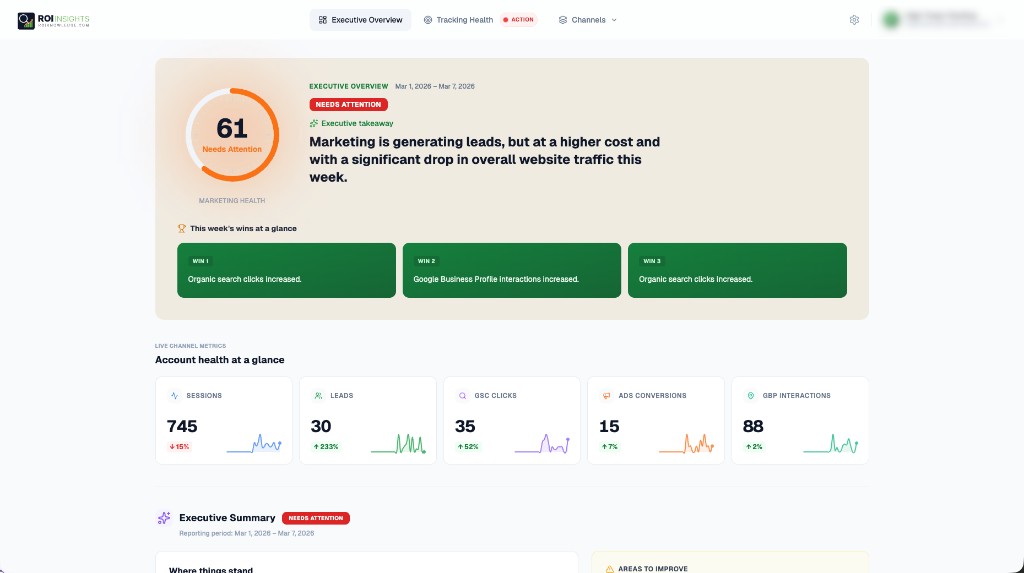
You're not opening a dashboard every day. You're shipping. On the Professional plan, the AI reads your data every week and writes you a plain-English briefing. Sample below.
Your week in ten lines
Traffic was up 34% week-over-week, almost all of it from the Hacker News thread you posted Tuesday.
Product Hunt produced 180 visitors and zero signups. Hacker News produced 890 visitors and 11 signups.
Your best-converting source this week was organic search for the phrase “Lovable analytics alternative”: 4 visitors, 3 signups, 2 paid.
Your worst-converting source was the Twitter thread you promoted. 312 visitors, 0 signups.
Recommendation: keep investing in the SEO angle, stop boosting Twitter posts, and write a follow-up HN post about the signup experience itself.
That's an example, not a testimonial. The real briefing pulls from your actual data: GA4, Google Ads (if you run them), Search Console, and any Google Business Profile you've connected. It runs every Monday. You read it in two minutes over coffee. You skip opening the dashboard for the other six days a week.
Pricing
Install Free. Upgrade the week you need to.
The measurement layer itself is free forever. One site, one-click Google connection, basic call log, UTM tracking, sixty days of history. Install it the day you ship. You're covered.
Upgrade to Professional ($39.95/mo) the week you realize you have real traffic and don't want to open a dashboard to understand it. You get the Weekly Advisor Briefing, full attribution tying visits to the keyword and campaign they came from, call recording and AI transcription if your app has a phone channel, and six months of history.
Business ($199/mo) is for builders running multiple sites: up to five under one subscription, two years of history, wholesale telecom rates, MCP AI agent access for hooking Claude or ChatGPT directly into your data. If you're at the point where you're shipping one app a month and want a single measurement layer across all of them, that's what Business is for.
What about PostHog, Plausible, Mixpanel?
Those are product analytics tools. This is a marketing measurement layer. Different jobs.
PostHog tells you what users do inside your app after they've signed up. It's built for product analytics: funnels, retention curves, feature usage, session replay. Useful. Different job. Keep using it if you already are.
Plausible, Fathom, and Simple Analytics are lightweight page-view trackers with privacy-forward design. They replace GA4 for people who want a cleaner dashboard. Useful. Different job. They don't do marketing attribution across Google Ads, Search Console, and Business Profile; they weren't built to.
ROI Insights is the layer that sits underneath all of them. It answers the question "which of the dollars I spend on marketing is producing paying users?" A question PostHog can't answer because it doesn't know about your Google Ads account, and Plausible can't answer because it doesn't tie visits to downstream conversion events. Run ROI Insights alongside PostHog or Plausible if you already use them. They don't compete. They solve different problems.
PostHog
Product analytics
Use it. Different job.
Plausible / Fathom
Privacy-first page tracking
Use it. Different job.
ROI Insights
Marketing attribution
The layer they don't cover.
FAQ
Questions builders ask
No. ROI Insights reads from your existing GA4 property. Install the ROI Insights SDK alongside what you already have. Nothing conflicts. You can think of ROI Insights as a layer that makes your GA4 install actually useful for marketing attribution, not a replacement.
If your stack is React-based (Lovable, Bolt, Cursor, Claude Code, Replit, v0, Windsurf, Base44, EmDash, Codex, or plain React), yes: one npm install. If you're on WordPress, the plugin handles it. If you're on a static site, the universal script tag handles it. If you're on something exotic (Svelte, Solid, HTMX, whatever), the universal script tag still works. The dashboard is identical regardless of install path.
The SDK is under 15KB gzipped and loads asynchronously. Page-load impact is measured in single-digit milliseconds. If you care about Core Web Vitals (and you should), the SDK is designed to stay out of the way.
Yes. The Free plan is free forever, no time limit, no trial clock. Keep a side project on Free indefinitely. The upgrade path is there if the project turns into something, not a forced step.
Call tracking is bundled with Professional and Business but isn't the primary value for pure-digital builders. What you're paying for on Professional is the Weekly Briefing, full attribution, and six months of history. Call tracking is there if your product has a phone channel, but it's not the reason most builders upgrade.
Your data stays yours. ROI Insights reads from your Google properties (GA4, Ads, Search Console, Business Profile) via OAuth scopes you explicitly grant. It reads and aggregates; it doesn't modify anything. All data is stored in per-account databases, never shared across accounts, never sold. You can revoke access any time from your Google account.
Install Free. Ship. Come back when the traffic starts mattering.
You're already spending time building. You shouldn't have to spend another weekend wiring up analytics. Install the SDK, paste your site key, and the measurement layer is running before your next deploy. When your app starts producing real traffic and you want the AI to do the analysis for you, upgrade. Until then, Free is Free.
Questions about the install? [email protected]